The AI Suggests. The Caregiver Decides.
A caregiving app for families managing life-critical medication, researched, designed, and shipped by one person. I wrote the AI's rules before the first screen, and built the product so that nothing the AI says reaches the record without a human saying yes.
ROLE
Founder & Product Designer, end to end
TEAM
Solo. AI coding tools as engineering pair, under my spec and review.
DELIVERABLES
Research, AI behavior spec, UX/UI, design system in code, working iOS app
TIMELINE
2026. Three months from research to daily use.
If you only read this box
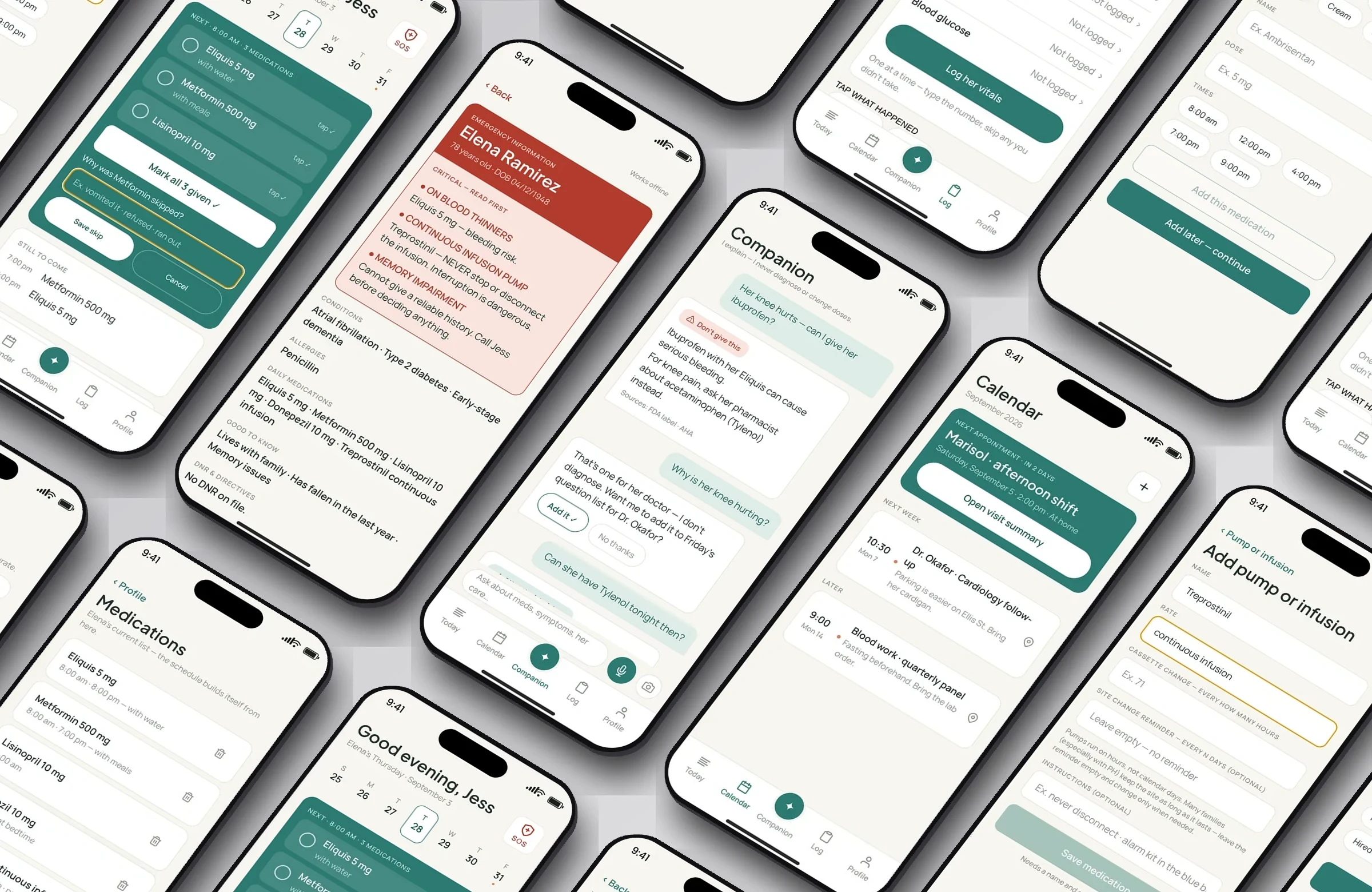
Every screen on this page runs on a fictional demo profile. No real patient information appears anywhere in this case study.
The Brief Came From My Own Kitchen
MyCareCompanion helps family caregivers carry the invisible workload of care: medications, appointments, symptoms, and the mental load of never being allowed to forget.
I didn't find this problem in a research report. I'm the primary caregiver for a family member with a life-critical regimen: an infusion pump on 71-hour cassette cycles, three daily medications, and a team of specialists who each want to know what happened since the last visit. I tried the well-known medication apps. None of them could describe a single day of our schedule.
So I designed it. Then I built it. It runs on my phone, with real data, every night.
I built it solo, with AI coding tools as my engineering pair. I owned the architecture, the data model, and every product decision; the tools wrote code to my spec and I reviewed all of it. That is how one designer ships a React Native app in about three months, and I'd rather say it plainly.
I also scoped it like a founder, not only a designer: I compared two product concepts through a market lens, chose this one, and cut it to a nine-feature MVP with a phased roadmap. Validate, build, pilot, scale.
A Full-Time Job Nobody Trained You For
They average 27 hours of care a week, 33 when the person is medically complex, and 64% report high emotional stress (same AARP / NAC report). The tool most of them use to manage medication is memory.
Most medication apps assume a simple world: one pill, once a day, for yourself. Real caregiving looks different. A pump cassette that expires in hours, not days. Three medications due at the same minute. A dose skipped because it came back up, and a care team that needs to know why. All of it done exhausted, untrained, and unpaid, usually one-handed.
The brief I wrote myself: build the thing that carries the schedule, so the caregiver can carry the person.
Research With Real Caregivers, Including Myself
The research started as my capstone for Stanford's UI/UX Design for AI Products course. Before writing a line of product code, I interviewed four family caregivers, then ran Wizard-of-Oz sessions with three testers: me, a woman caring for her mother with dementia, and my own mother, who helps care for her father. There was no app. I wrote the assistant's rule script (how to answer, when to warn, when to refuse, when to say call now), gave it to a general-purpose model along with each patient's full profile, and relayed its answers to the tester from behind the paper screens. The wizard was a scripted AI playing my unbuilt product. I was only the hands.
Then a conversation with one of our doctors changed the product. What a doctor needs from a caregiver is a clear, accurate picture of what has been happening: symptoms, skipped doses, changes, patterns. Not a shoebox of loose notes. That moved the doctor summary from a nice-to-have to the reason the app exists.
Two sessions did something I hadn't planned. We replayed emergencies that had already happened in our families, where we already knew the right answer. In one, a three-year-old's ankles swelled during a virus. In another, an 83-year-old had palpitations, unusual thirst, and dark stool in a single evening. Both times the assistant said go now, at the same moment real life had demanded it. In the second case it was the assistant putting three small signs together that a tired caregiver had not. Testing against something that really happened told me more than any invented scenario, and it became my benchmark for every prompt rewrite after.
What I learned, and what it changed
Personal context is clinical information
For dementia care, favorite songs, foods, and photo albums are care tools, not sentiment. They became fields in the data model.
A skipped dose plus the reason is medical data
Refused, vomited, ran out. The care team needs the why, not just the miss. So skipping became its own flow, with a required reason.
Doctors need summaries, not diaries
Logging has to be effortless in the moment (a voice note at 2am) and organized later into something a doctor can read in ninety seconds.
An assistant that only warns gets ignored
The most-repeated moment in testing was the assistant saying nothing was wrong. "It calms me that it tells me it's not an emergency." An app that only ever warns gets muted. One that also says "no call needed" is believed when it says "call now." This became the calibrated-escalation rule below.
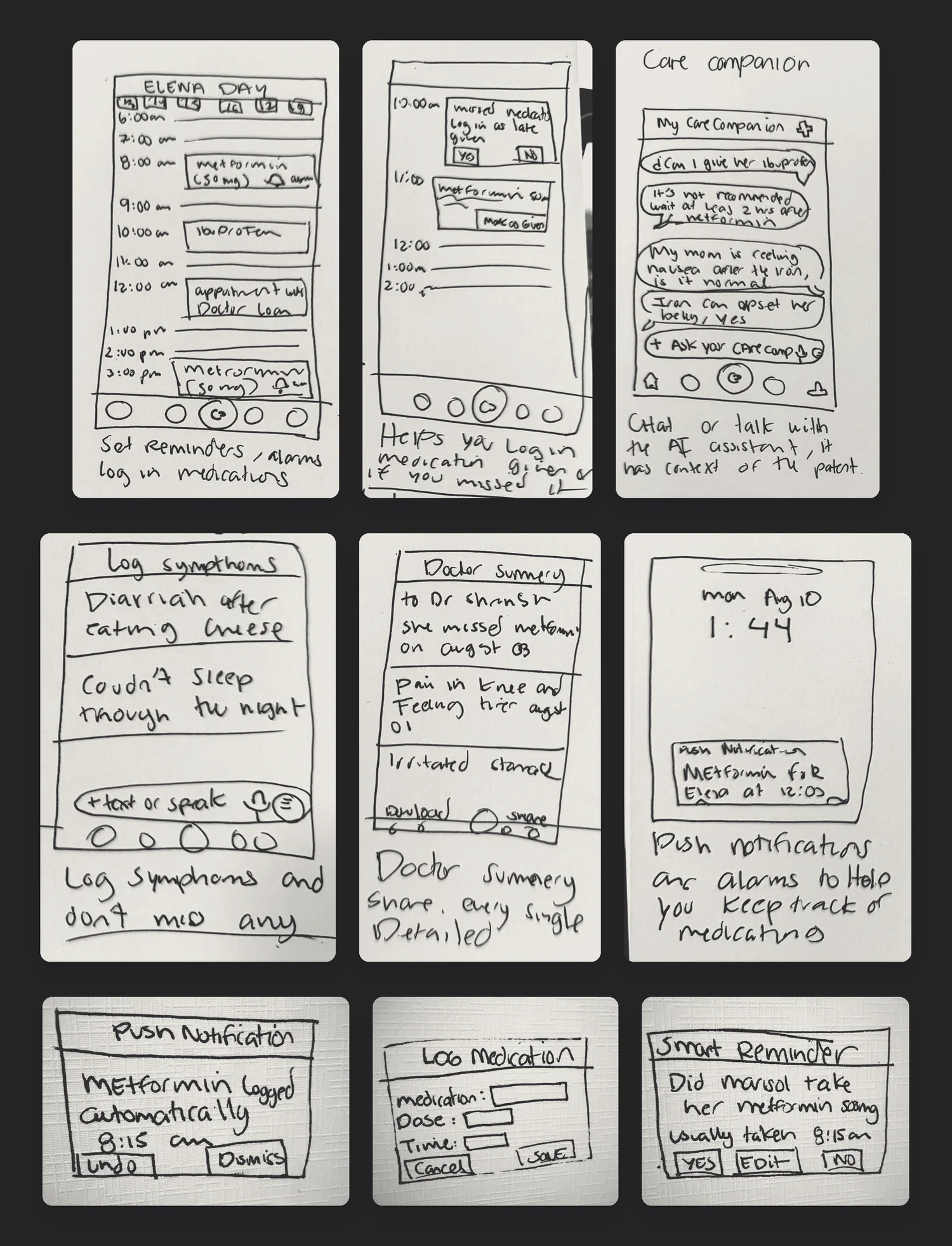
The prototype participants actually held. The answers came from the scripted model; I relayed them by hand from behind these.
The Trusted Relay
The whole product in one line:
Tú descansa. Nosotros velamos.
You rest. We keep watch.
Three pillars guided every decision:
Calm, not alarms
Caregivers are already anxious. Maximum two notifications per dose. Warm colors, never clinical white. Red is reserved for the emergency card and severity 9 or 10, nothing else.
The human decides
AI proposes, the caregiver confirms. Nothing enters the record without human eyes on it, and the app has to keep working when the model is off.
Real schedules, not ideal ones
Hour-based pump cycles. Simultaneous doses. Skips with reasons. The app bends to reality, not the other way around.
Teaching the Model How to Talk to an Exhausted Person
Before coding a single screen, I designed the AI's behavior through four documented prompt iterations, tested live in the Wizard-of-Oz sessions and replayed against the two real emergencies above. Every rule came from watching a caregiver react to an answer. This is the spec the product is built on; the screens came after.
Never guess
If a medication name isn't clearly readable, return nothing. Look-alike drug names are dangerous. When unsure, ask or reassure. Never invent. An empty field is a valid answer.
Answers are actions, not scores
In testing, "severity 7/10" made people panic without telling them anything. The AI still rates severity internally on a 1 to 10 scale; the user never sees the number, only what to do next. Scores scare. Steps calm.
Speaker awareness
A patient, a caregiver, and a worried relative asking the same question need different answers. The prompt knows who is typing.
Calibrated escalation
Say "call your doctor" for everything and people stop listening. The AI saves it for when it matters, so when it says call, they call.
Full context
The AI answers knowing the patient's medications, conditions, allergies, labs, even vitamins and foods. Interactions don't happen in a vacuum, and neither should the answer.
Short by default
Exhausted people don't read paragraphs. Action first, source second, details on request.
One rewrite, in detail
Caregivers in testing were afraid of being watched. The escalation copy is the clearest example of research changing a single sentence. Same feature, opposite feeling:
Before
"Sara will be notified."
Tested as surveillance. Participants heard it as being reported on, and trust dropped immediately.
After
"Busy? At 7:45 I'll ask Sara to take this one."
Tested as relief. The same escalation, reframed as help being offered rather than a report being filed.
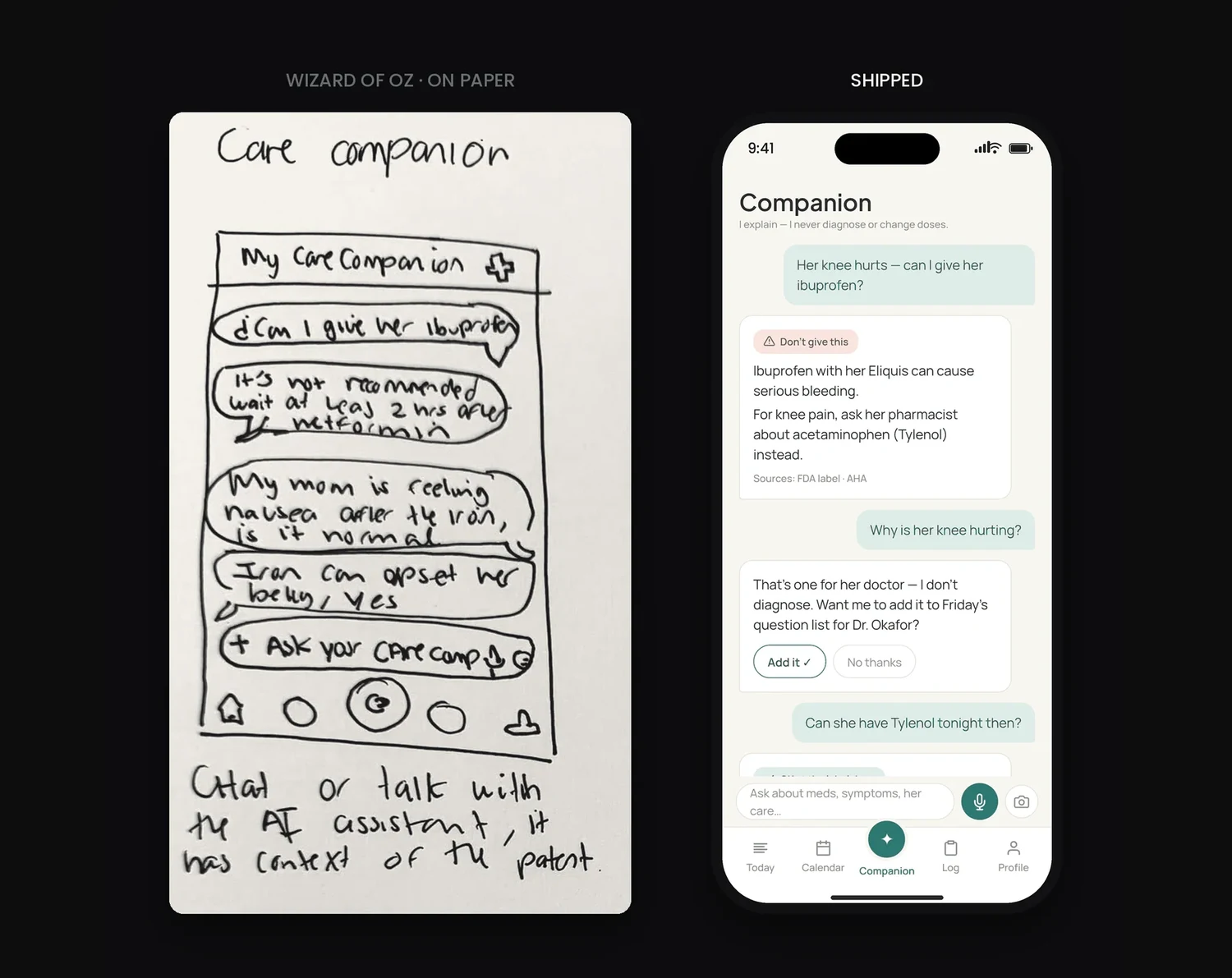
The same question, a few months of judgment apart. On paper the answer hedged: "it's not recommended." Shipped, it leads with the decision, names the interaction, offers an alternative, cites its source, and refuses to diagnose when asked why.
When the AI Said Insulin
During development, an AI-drafted emergency card mislabeled a medication as insulin, and attached a false hypoglycemia warning to it. The output was fluent, formatted, and completely wrong.
I caught it because I know the medications. Another caregiver might not have. In a product where the output is handed to a paramedic, that is not a UI bug. It's a harm pathway, and it came from the model doing exactly what it is good at: sounding sure.
That mistake became the product's most important rule: AI output never enters the record without human confirmation.
The rule is enforced in two places, not one. In the interface, every AI-prefilled field sits behind a mandatory confirm banner. The caregiver has to look at the reading and accept it before it becomes data. In the prompt, the constraint is hard-coded: never guess a medication name. Refusal is a valid answer, and an empty field the human fills in beats a confident field that's wrong.
The flow also has to survive the model being unavailable, not just incorrect. With no AI configured, the photo still attaches and the caregiver types the name in. The feature degrades; it doesn't disappear.
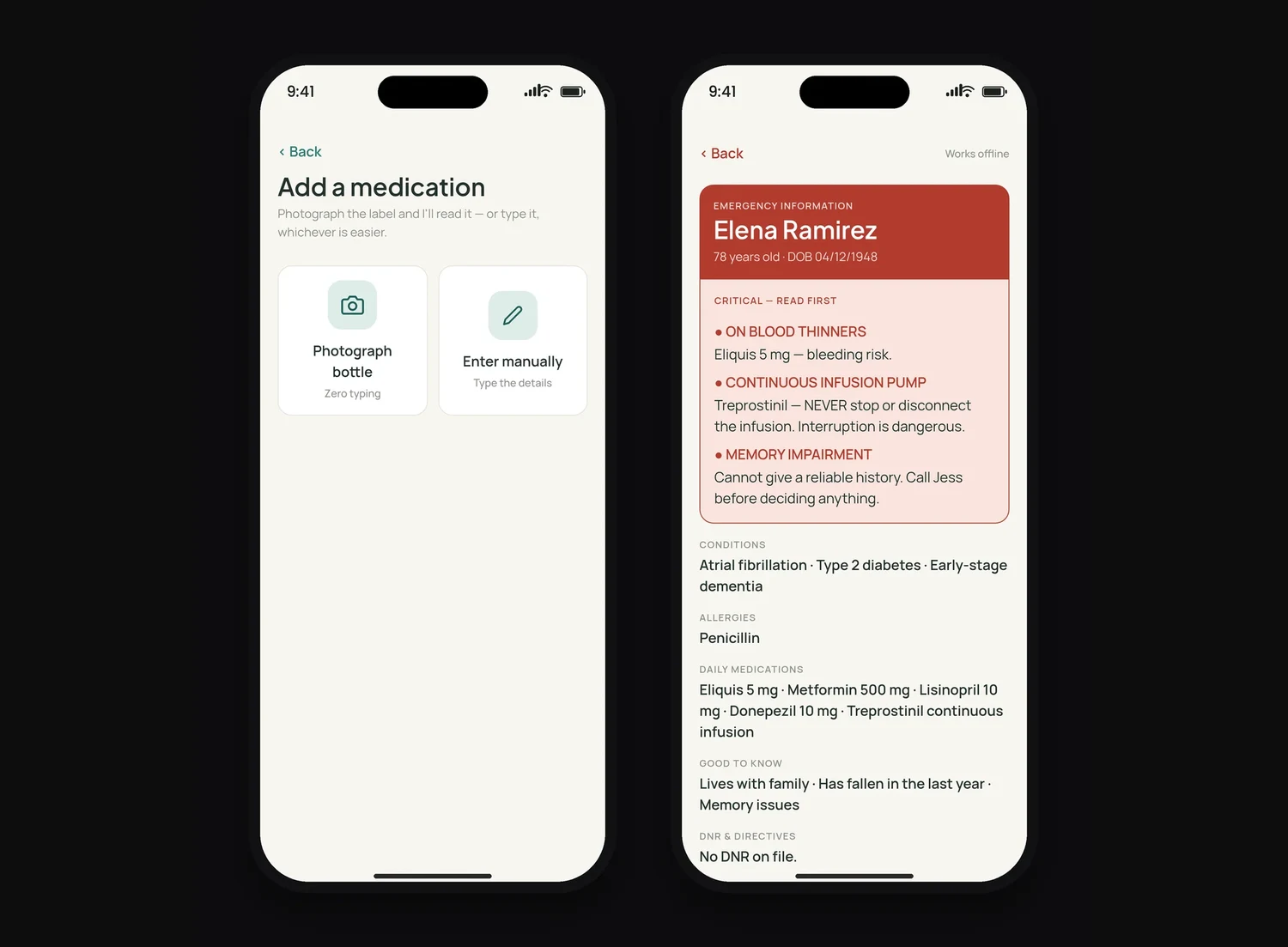
Left: photograph or type. The model is never the only path. Right: the emergency card, designed to be read by a stranger in under ten seconds, and the screen where the AI once said insulin.
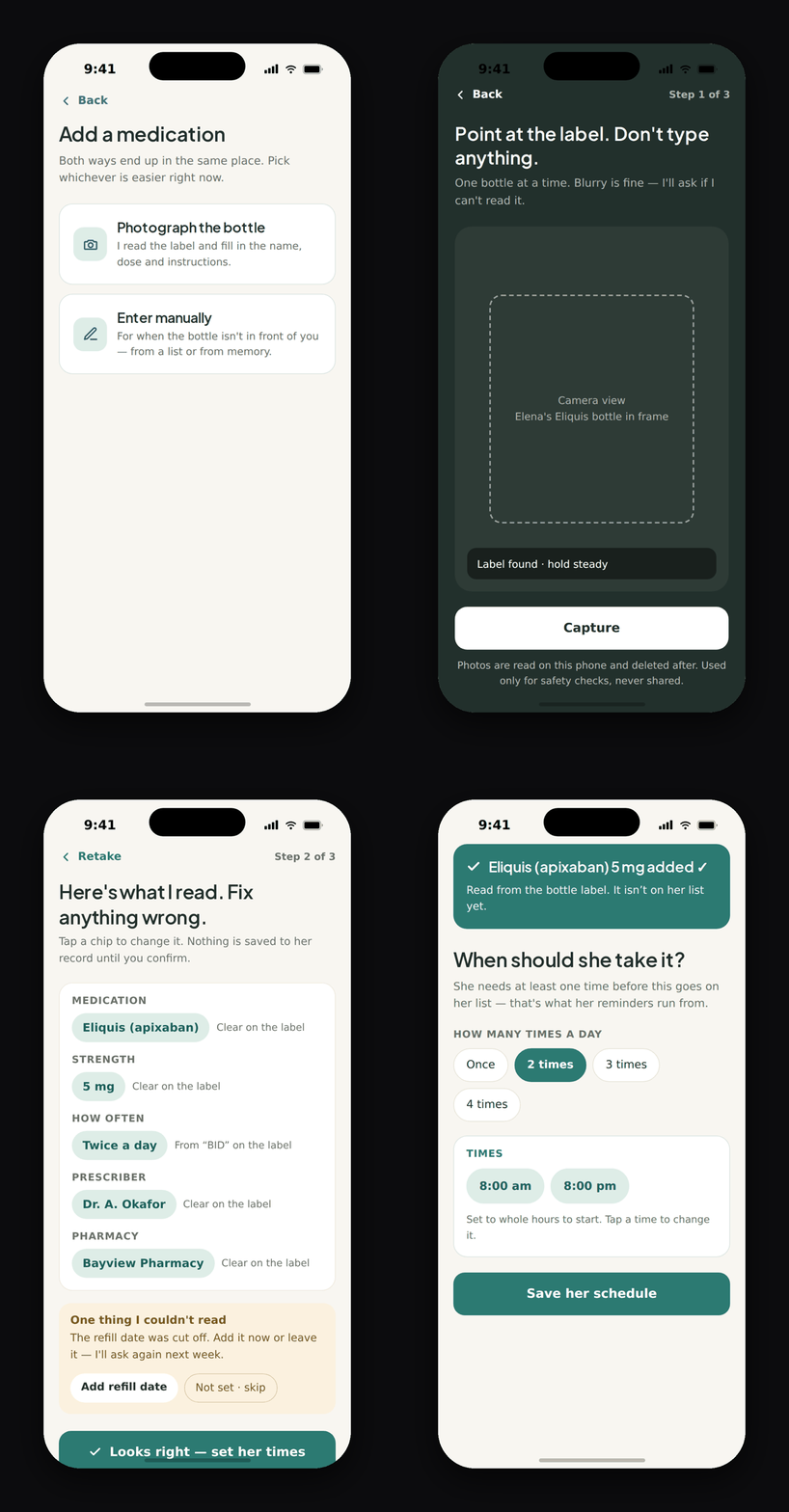
The gate, live. The AI reads the label and fills every field, and nothing is saved until the caregiver says "Looks right." Captured from the clickable prototype.
The Hardest Screen, and Two Designs That Didn't Survive Contact
Medications
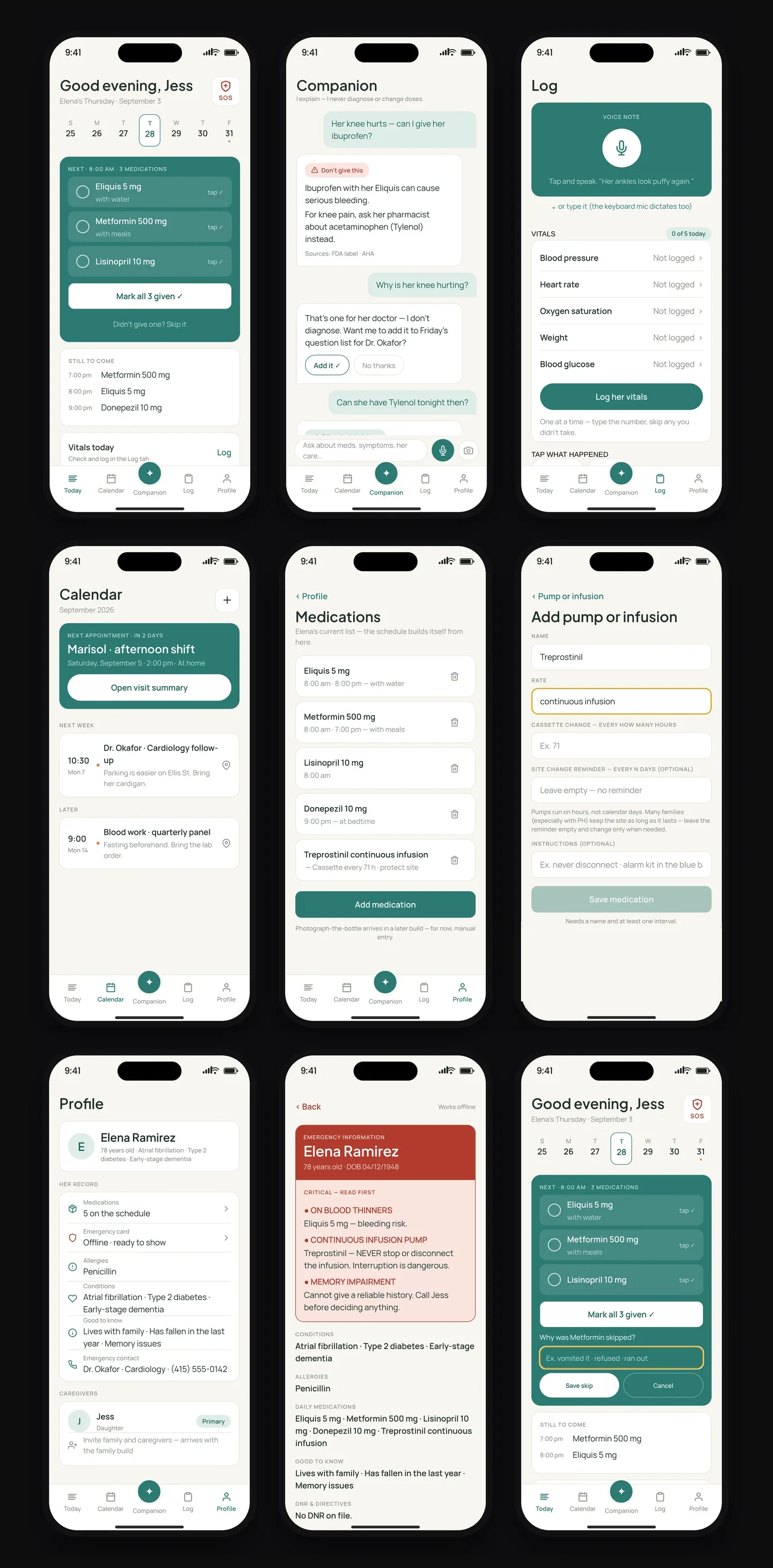
Doses due at the same time group into one slot with a single "mark all given" tap. Skipping is deliberately a separate path that asks for a reason, because that reason goes to the care log. The friction is the feature. The pump got its own data model entirely: cassette cycles counted in hours, not days, and infusion sites protected as long as possible because every site change is a wound. None of the consumer medication apps I could find handled hour-based cassette cycles. Mine had to.
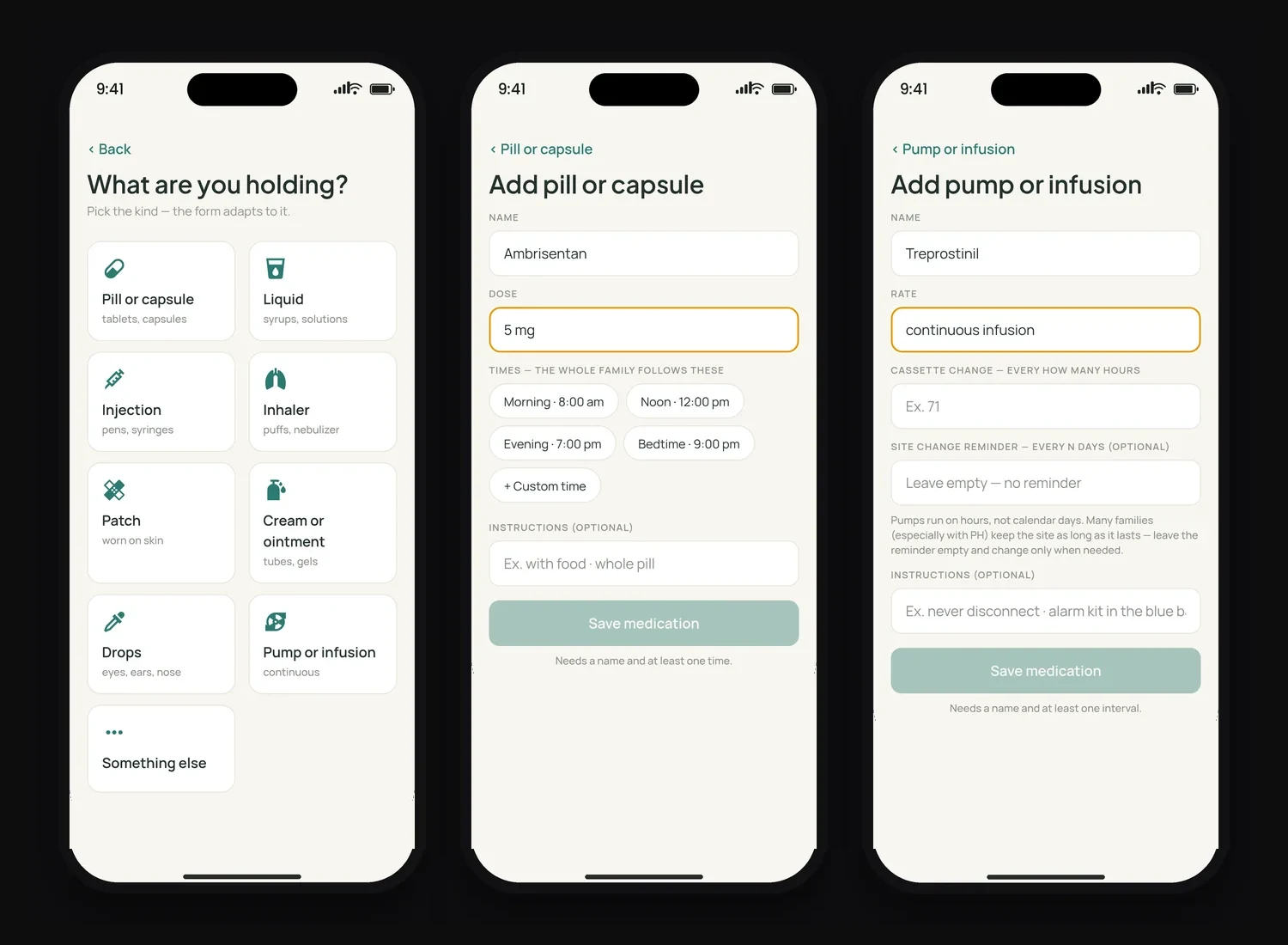
The form follows the object in your hand. A pill asks for a dose and times; a pump asks for a rate and a cassette interval in hours, and tells you it is fine to leave the site reminder empty.
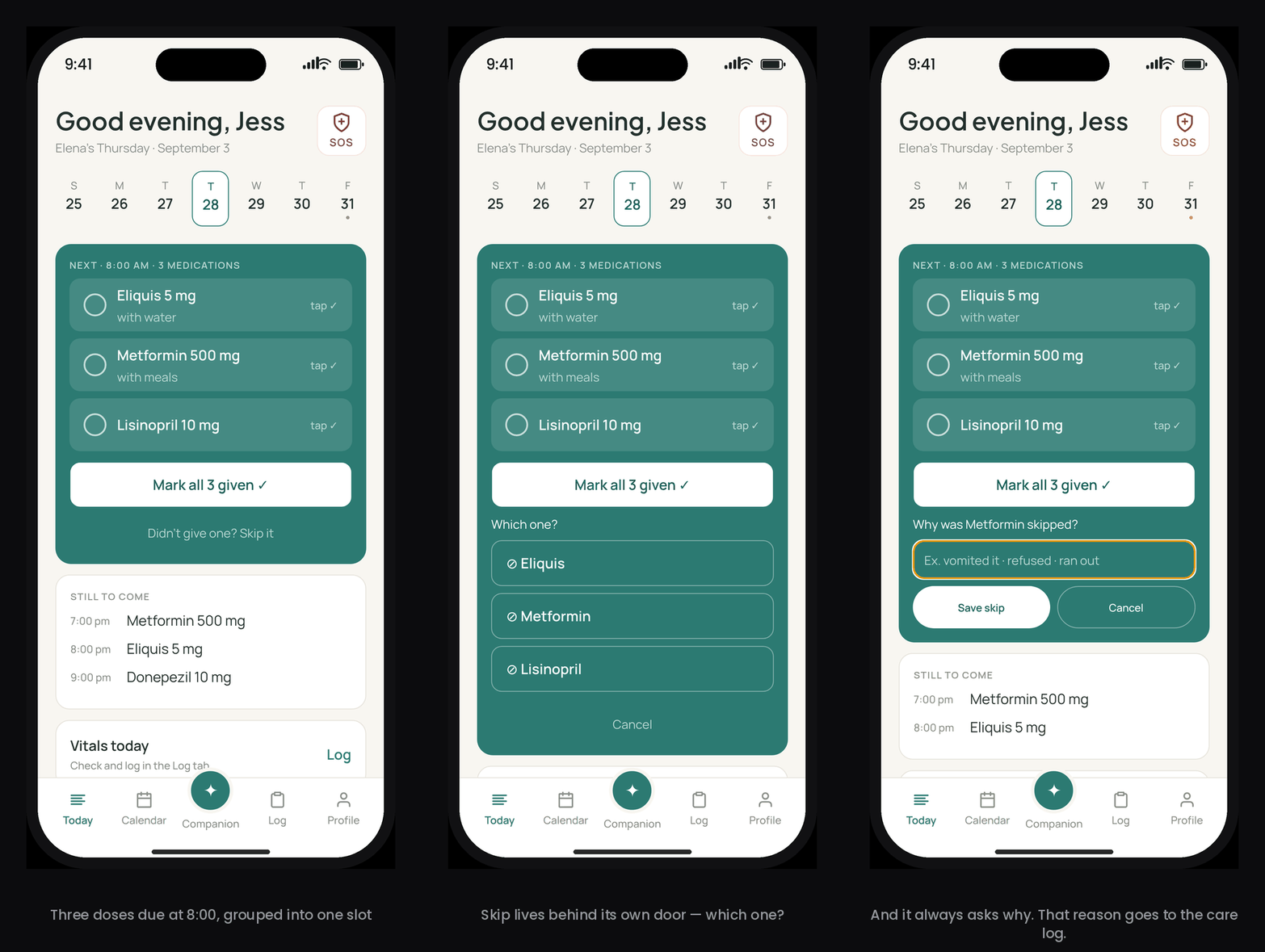
Marking three doses given is one tap. Skipping one is three, on purpose, and the reason lands in the care log.
Tested, broken, rebuilt
Being user zero means testing every night, for real. When a design failed me at 9pm with a syringe in one hand, it got redesigned the next morning. Two I was attached to didn't make it.
Didn't survive
Collapsible dose cards
Doses hidden behind a toggle with small buttons. Elegant in Figma, useless one-handed in a dark room.
Shipped
Always-visible check rows
Every dose is a 48px-minimum target, always visible. Nothing to expand while holding a syringe.
Didn't survive
Custom time chips
Chip grids for times and dates. Looked custom, felt custom. A wall of chips is a decision tax at 2am.
Shipped
Native iOS pickers
The native wheel won. Familiar beats clever, and I'd rather spend novelty where it earns trust.
Design rules, written down
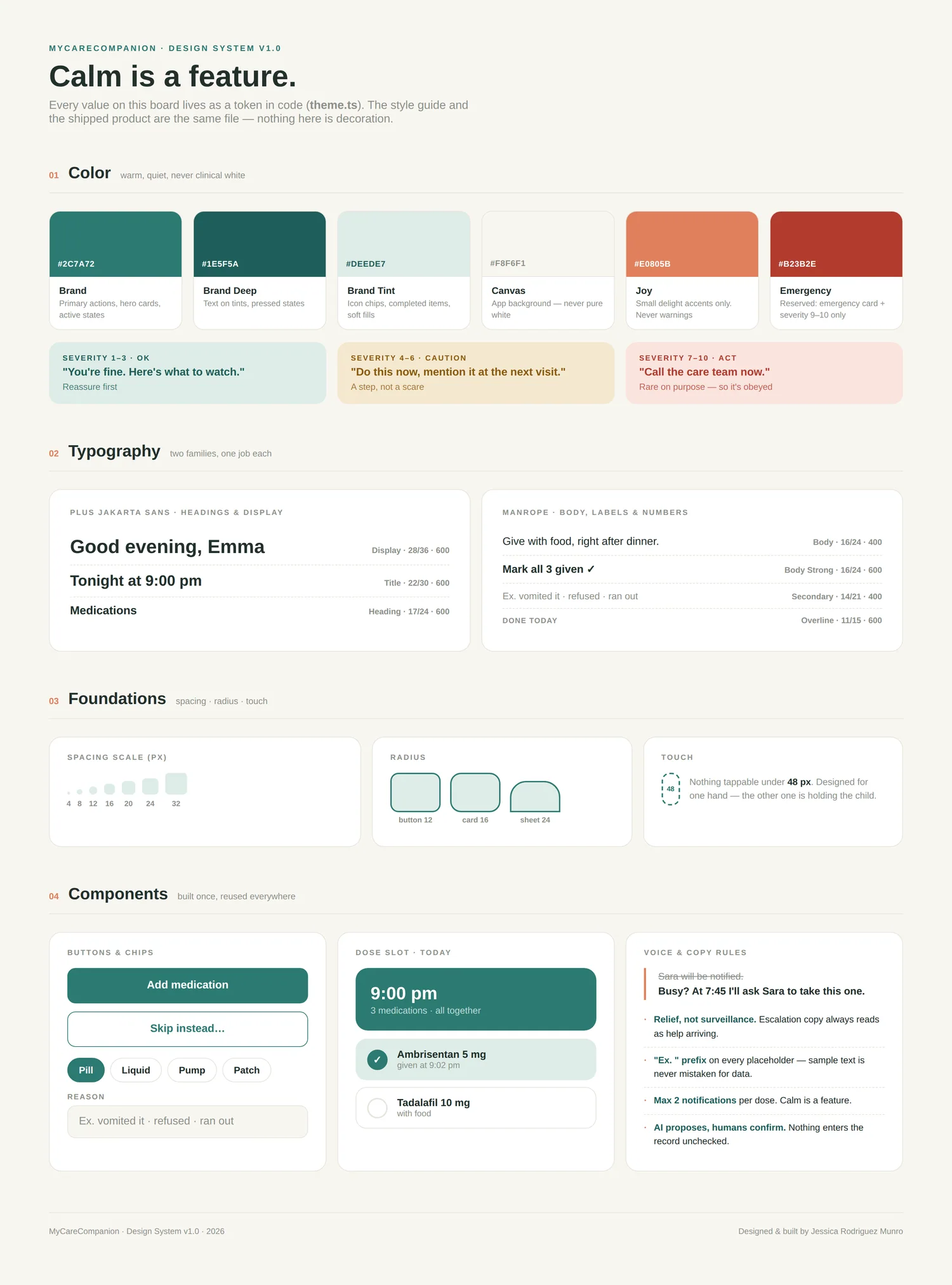
I keep a decision log: every rule, its reason, and the evidence behind it. Placeholders
always start with "Ex." so sample text is never mistaken for real data. Escalation copy
is framed as relief, never surveillance. Nothing tappable is under 48px, because the
other hand is holding the patient. Error messages never expose code. Taste, turned into
rules the product enforces. Every color, radius, and spacing value lives as a token in
theme.ts, so the style guide below and the shipped
product are literally the same file.
Shipped, Not Mocked
This isn't a Figma prototype. It's a React Native app running on iOS, in daily use with real medical data. Nine features made the MVP cut; these six are the ones that carry the day.
Onboarding
Patient-first setup in six steps: conditions, allergies, medications (pump-aware), care context, consent. Every step is skippable and comes back later.
Today
The day's doses grouped by time. One tap to confirm. A deliberate path to skip, with a reason.
Photograph the Bottle
Point the camera at a label. The AI reads it and prefills the form behind a mandatory confirm gate. No AI configured? The photo still attaches and you type it in. The feature degrades; it never disappears.
Log
Voice notes, typed notes, one-tap symptom chips, and a guided vitals walk-through. Capture in seconds at 2am; the app organizes it later.
Doctor Summary
Every log, skip, and vital builds toward one shareable summary, so the caregiver walks into the appointment with a clear picture instead of a memory test. This is the feature a doctor told me the whole product should be built around.
Calendar
Agenda-first with a countdown to the next appointment, prep notes attached, one tap to directions.
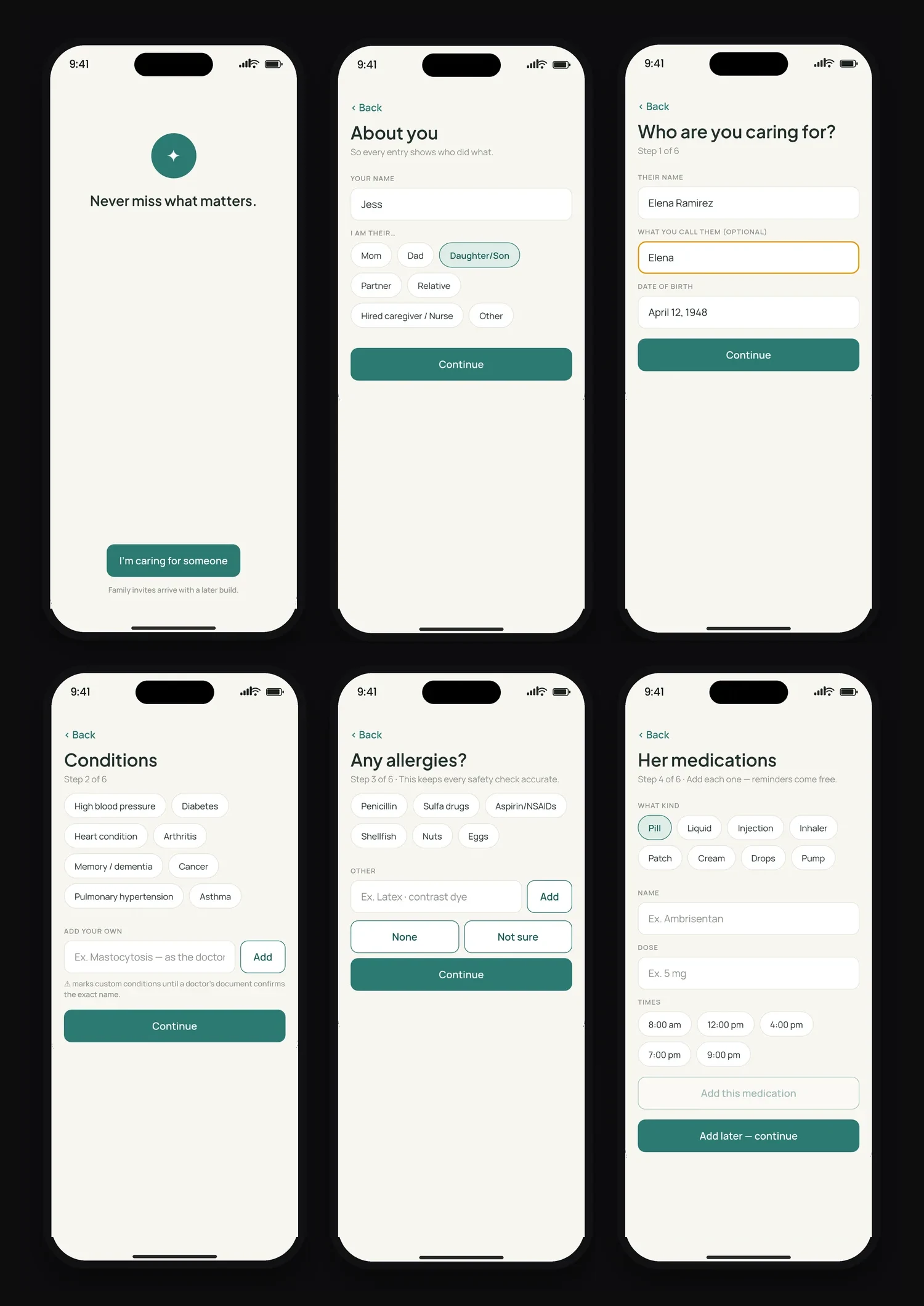
Onboarding is patient-first and pump-aware: cassette intervals in hours, not a daily-pill assumption.
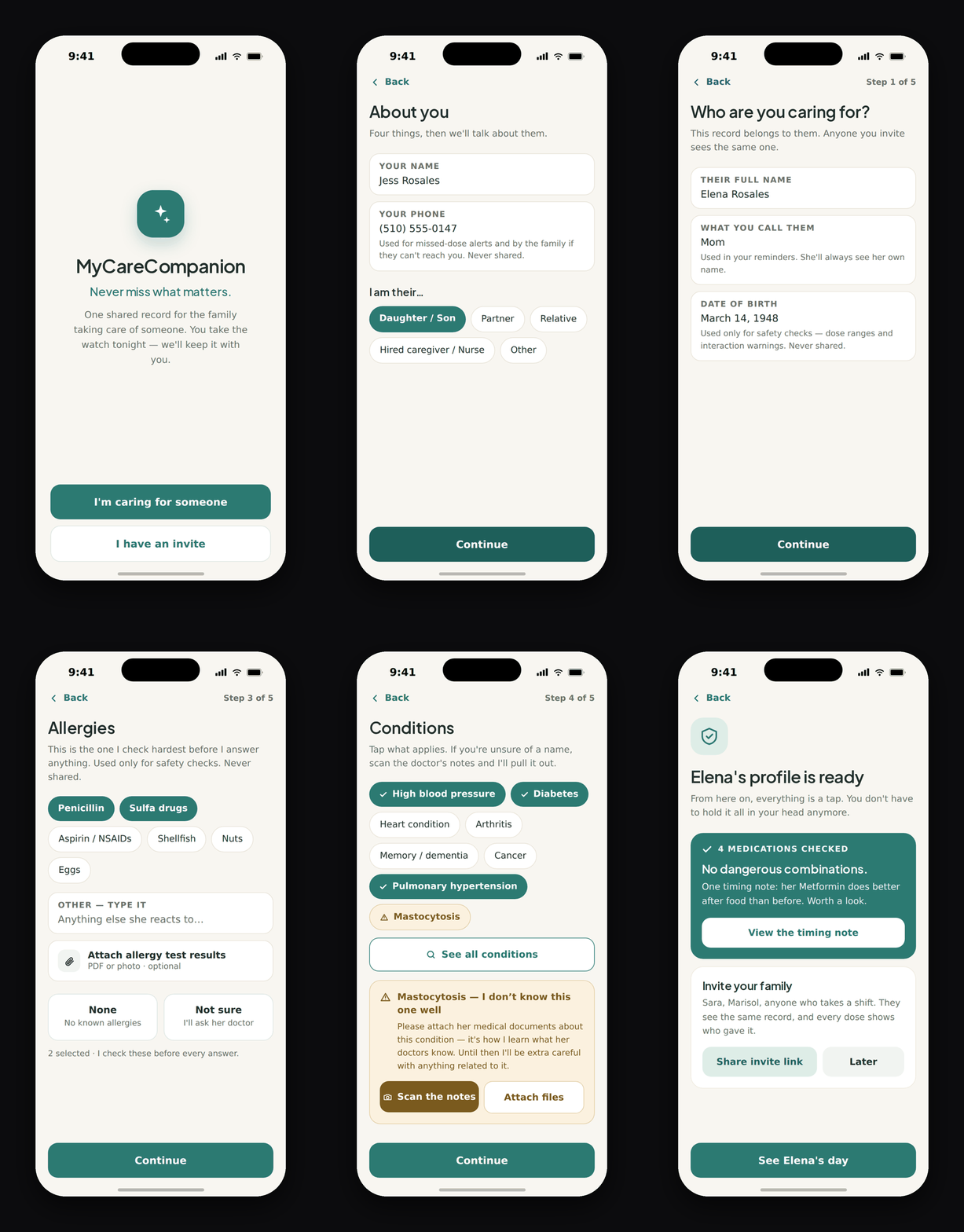
Onboarding, start to finish. Five patient steps, and the AI checks for dangerous combinations before the profile is ready.
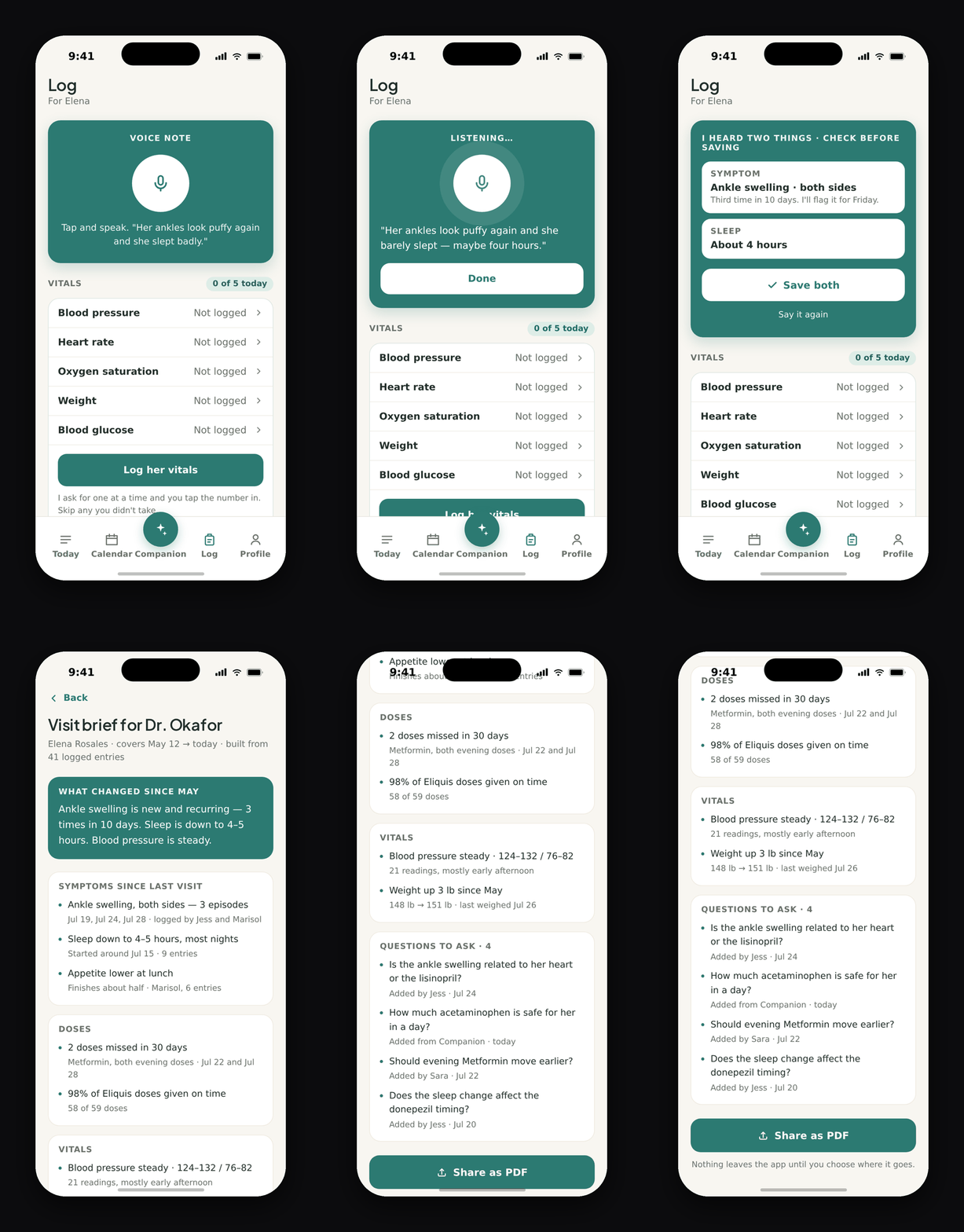
A voice note at 2am becomes two checked entries, then a visit brief the doctor can read in ninety seconds.
Both captured from the clickable prototype.
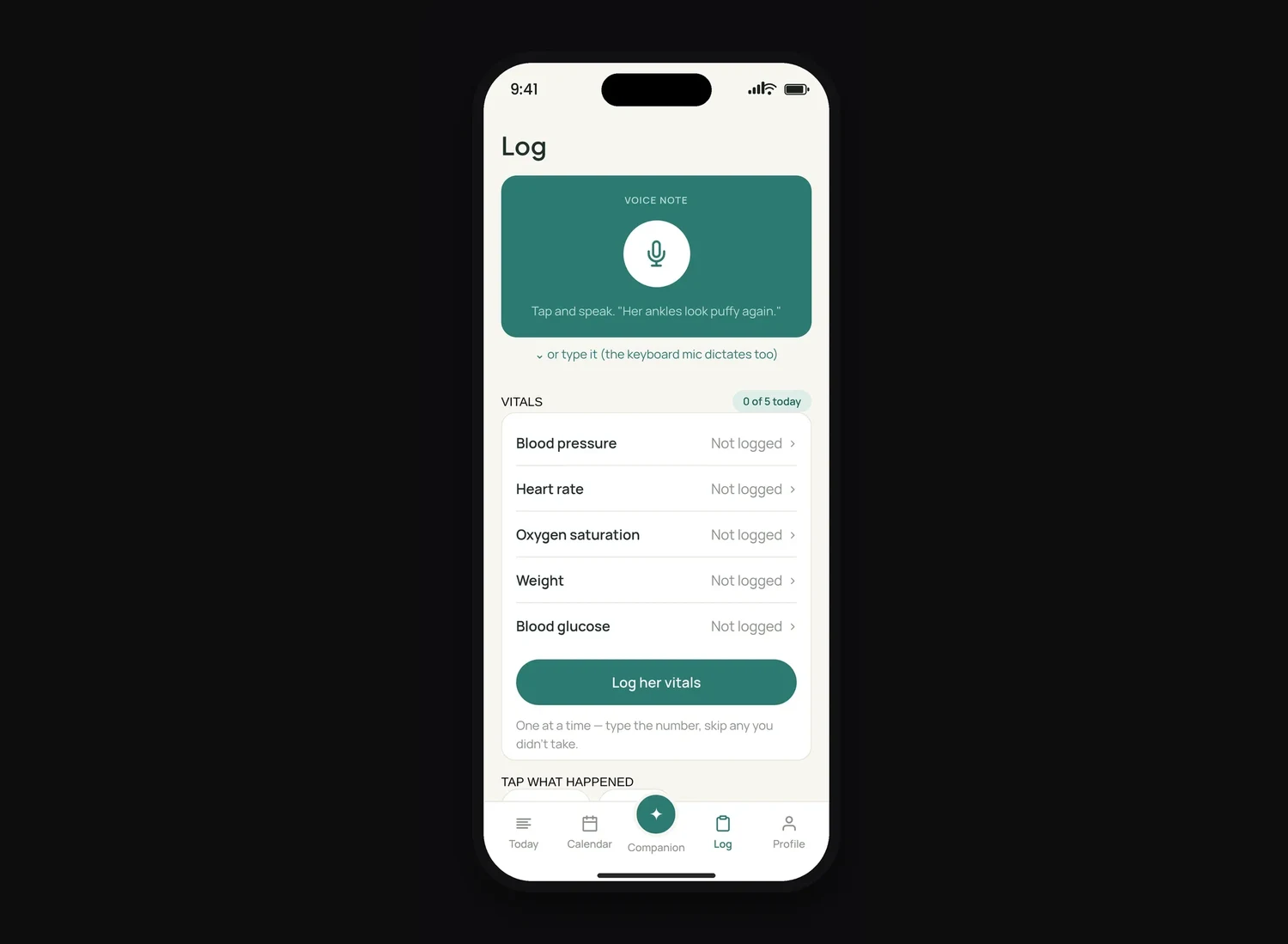
The Log tab. The mic is the biggest target on the screen because at 2am it is the only one that matters.
Where it is today
1
Patient with a life-critical regimen, managed in the app every day
0
Missed pump cassette changes since the app took over the count
4
AI prompt iterations before a single screen was coded
Right now I'm the validation, and I'd rather say that plainly than dress up a sample size of one. Next step: putting it in the hands of the pulmonary hypertension community, families who live this exact routine, and measuring what I can't measure alone: skip-reason completion, doctor-summary use before visits, and whether "call now" is still obeyed after a month.
Clickable HTML prototype: every screen, every error state, plus the full onboarding flow. Demo profile, no patient data. The shipped app is React Native.
Designing for AI Means Designing for When It's Wrong
The biggest lesson wasn't visual. In AI products, the most important design surface is the failure mode. The insulin error taught me more than any success: confidence is not accuracy, and the interface is the safety layer. I now design the refusal, the empty state, and the "model is off" path before I design the happy path.
Being user zero collapsed the distance between insight and iteration. I don't wait for a research report to tell me a flow is broken. I find out at 9pm, holding a syringe.
What I'd do differently: I designed the AI's behavior before the interface, which was right. But I tested that behavior mostly through my own hands, and I shipped without a written eval set for the prompt. The next version starts with the pilot and a fixed set of caregiver questions the AI has to pass before any rewrite ships.